Skip work that does not need to run.
Affected-story selection limits captures to stories your change can reach. A warm browser avoids another launch between local runs. Exact matches need a hash comparison.

Visual tests for your Storybook
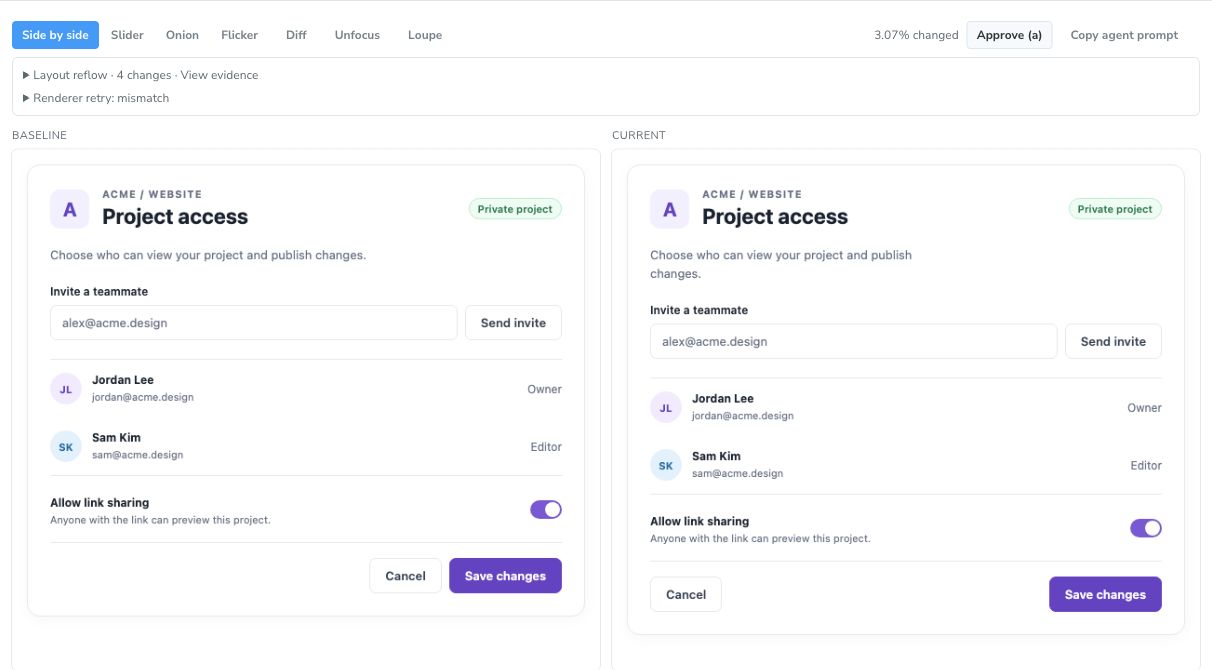
Give your agent specific screenshot and DOM evidence. Juxtapose compares your rendered UI with approved baselines, so you can review the change and decide what to fix.
Open source. Runs locally or in CI. No cloud account needed.
Build toward a reference. Keep what you approve.
Start with a design comp, a reference screenshot, and what matters to you. Let the agent build, then review the rendered result against that intent.
Define the layout, states, and details to preserve.
Make a concrete change in the component.
Inspect the UI at the intended viewport and theme.
Compare with the reference and describe what is still off.
Use the feedback to make the next edit. Repeat until it is right.
Establish the rendered baseline after review.
Reference review guides the design work. Juxtapose currently compares rendered captures; importing Figma files or automatically scoring a design comp is not supported.
Approved baseline edit capture + compare inspect the screenshot and DOM diff.
Unexpected change? Fix it, capture again, and compare with the same baseline. Intended change? Review and explicitly approve the new baseline.
Actual capture, with the diff overlay off and on.
What the tool does
Affected-story selection limits captures to stories your change can reach. A warm browser avoids another launch between local runs. Exact matches need a hash comparison.
Deterministic comparisons report changed elements, properties, and values. That narrows what the agent needs to inspect; screenshots and crops remain available when the structure does not explain the change.
Settling, animation controls, and fresh-capture confirmation help separate repeatable changes from timing or renderer history. A mismatch can retry with a cache pulse and then a fresh renderer. Unstable stories still need attention.
Hosted review · Early access
Upload a captured run to review it in the browser and link it to a GitHub pull request. Hosted uploads require CLI 0.23.0 or later; local use needs no cloud account.
Get started